

Building a website can feel like an uphill battle. You just want a sleek, high-converting site. But suddenly, you’re hearing terms like SSL, HTML, CMS, CSS, wireframes, and responsive layout—and it’s like being dropped into a foreign country with no map, no translator, and a fast-talking tour guide. However, what if I told you that I designed this very website myself, with zero coding experience?
There was a time when I believed that building business websites was only for developers or big-budget agencies. But I discovered something crucial: it’s not always about being a tech genius or throwing piles of money at fancy developers.
Sometimes, all it takes is the right tool—one that lets you take control, even if you’ve never touched a line of code in your life.
You’re probably overwhelmed, staying up at 2 AM wondering “How hard is it to build a website?”. You might even be on the verge of giving up, thinking ,“Maybe I’m just not cut out for this.” I understand, because I have been there – before I discovered the Divi theme builder.
Now, before we get started, just putting it out there: this post does contain a few affiliate links. If you happen to find something useful and decide to purchase through them, I might earn a small commission – at absolutely no extra cost to you, of course! But I promise: everything here is 100% from my own hands-on experience. My goal here is to help you, just like others helped me. For what it’s worth, you can also take a tour of this website to see for yourself what you can build with the Divi website builder.
Here’s How I Built a Website (And You Can Too!)
So, did I actually set out building a website from scratch on my own? Honestly – no. I had help.
We started by reaching out to The Free Website Guys, an incredible team that builds websites for small businesses and entrepreneurs at no cost. At that point, our only other option was hiring a professional designer—which would have cost us a pretty penny. Being primarily writers by profession, none of us had much web development experience back then.
Thankfully, The Free Website Guys accepted our pitch and decided to take on the project. They took care of the basics, handling the WordPress setup and essential plugins before moving on to the design.
This was when they introduced us to Divi
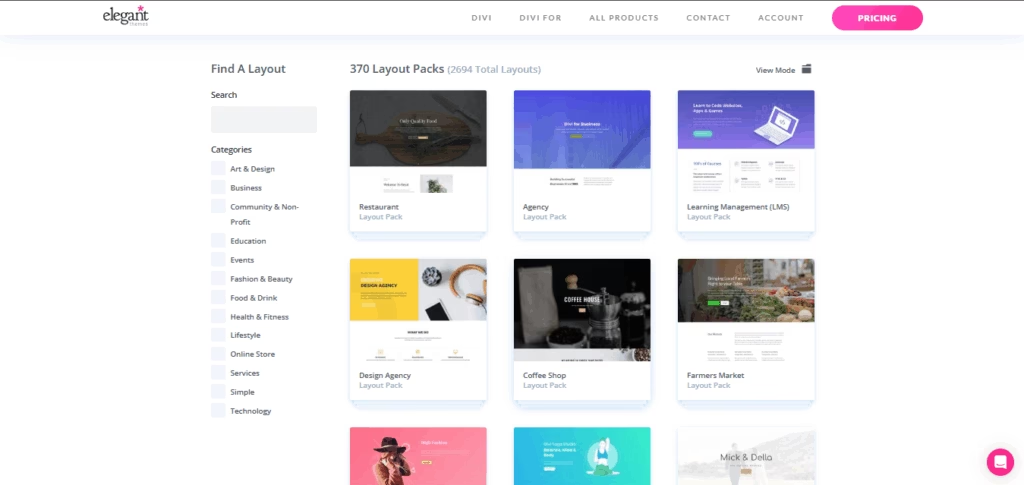
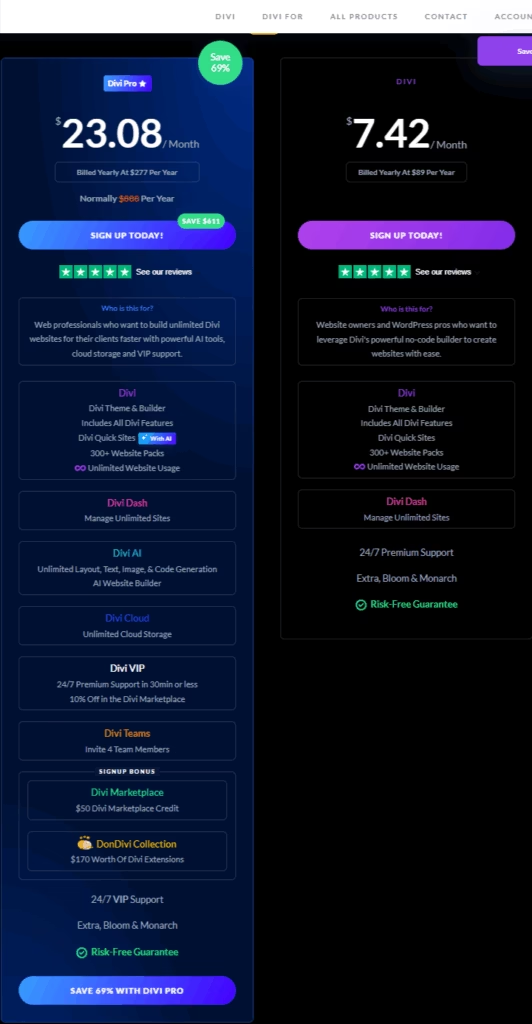
They gave us two options: stick with a few free starter templates or invest in a Divi subscription. For $89 a year, we’d get access to 2000+ layouts, a full website design system, and powerful visual building tools. For a team of writers running a passion project, $89 felt like a stretch. But the demo video they sent made it clear – Divi wasn’t just another tool. It was a game-changer for anyone wondering how to make a beautiful, responsive website without coding.
Not only does Divi offer the kind of features a pro might expect from a premium page builder plugin, but it’s also intuitive enough for someone like me – zero coding experience, barely knowing what a CMS was. For the record, I still don’t know what half of these technical jargons mean.
A couple of weeks later, they wrapped up the basic structure and handed the controls over to us.
And who took the reins? Me. The only person on the team with some (albeit little) web design experience.
Naturally, I panicked a little. I wondered “How hard is it to build a website when you’ve never done it before? How hard is it to make your own website with no background in code, design elements, or even understanding how headers & footers work?”
Turns out—it’s not as hard as you think.
Divi made it simple. The dragging and dropping felt like using a visual canvas. I didn’t need to write a single line of code. If I got stuck, there were tons of tutorials on YouTube (especially on Elegant Themes’ channel), and best of all – you get built-in video walkthroughs inside the builder. Just click on a help icon, and up pops a short guide right in the editor.
I’d also like to extend my thanks to amazing Reddit communities such as r/Wordpress and r/Divi. While it was rather infrequent, there were times when I needed help, especially with some of the technical aspects such as setting up an SMTP to deliver contact form messages to a new, custom email address. I didn’t even know about SMTPs and what they do, but there were plenty of helpful folks out there who gladly guided me, step-by-step. So, if you’re wondering “Is it easy to create a website?” – my answer would be a resounding yes, even if you have zero experience.
How Hard is it to Build a Website With Zero Coding? With Divi AI, It’s Not!
So, did I really build this website with zero coding? Believe it or not, yes! – although Divi allows you to use custom CSS for every module, granting you complete control over the design and user experience. For the most part, the extensive customization features in the Divi visual builder were enough to bring our vision to reality. This includes everything from the comparison table with expandable toggles in our homepage to the floating animations on our about us page.
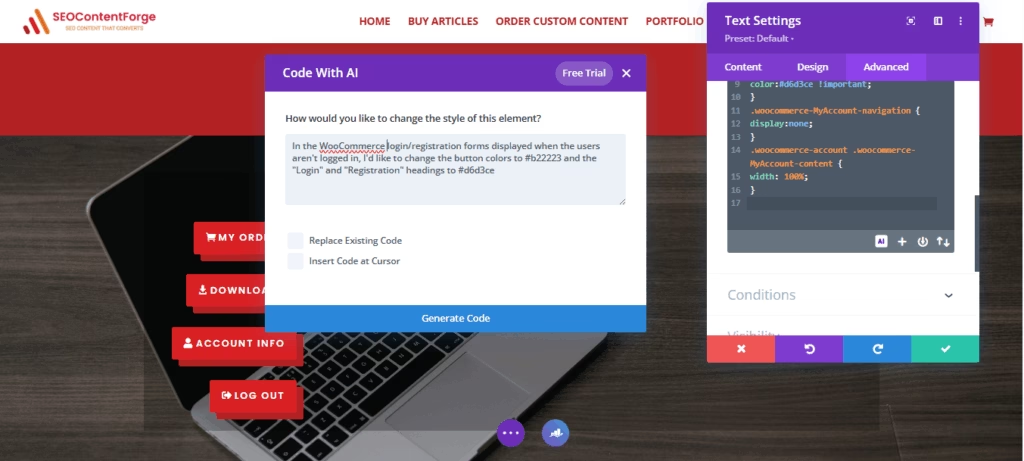
However, I encountered a hurdle when it came to customizing the WooCommerce modules – such as the registration/login form and our checkout page. These modules are made of WooCommerce shortcodes, which can sometimes restrict you from customizing them fully using a visual builder. The only way to customize them is to insert custom CSS codes. Did I have to write those codes, though? No! As a matter of fact, I didn’t even have to search for the codes online. Divi AI took care of it all!
This amazing web page builder offers 100 uses of Divi AI with the base subscription plan, which you can use for a variety of purposes, from coding to image generation. To my surprise, it came up with the necessary code in seconds, making exactly the changes I wanted!
So, to sum it up – 99% of my website-building journey involved no coding at all, while Divi AI handled the remaining 1%.
What Does It Really Take to Build a Website?
Building a website with HTML can be a daunting thought. You probably picture endless lines of code, late-night caffeine-fueled frustration, and maybe even needing a computer science degree. Trust me – I’ve been there too.
Modern CMS platforms like WordPress, paired with tools to build a website like Divi, have taken the complexity out of the process. No coding expertise needed. You don’t need to memorize HTML tags or understand what a “div” does in code. The magic lies in user-friendly platforms that do the hard work for you, so you can focus on creativity and content.
Here’s what I realized you really need:
The Basic Skills to Build a Website:
- Basic computer skills – If you know how to browse, type, and drag files, you’re set.
- Willingness to explore – A bit of curiosity goes a long way.
- The ability to follow tutorials – YouTube and WordPress forums are full of easy-to-follow guides.
- Essential tools to build a website – Think WordPress, a solid theme, a page builder plugin, and a reliable hosting platform.
Sure, building a website with HTML manually is still a thing, and it can be powerful – if you’re a developer. But for the rest of us? Learning how to build a website with HTML is optional, not mandatory.
What you really need is the confidence to start – and a tool that meets you where you are.
Surely, Divi Isn’t the Only Option Out There?
Of course not! Divi is only one of the many website builders you can use for your site. However, if you ask me – it’s probably the best. While my web design experience is limited, I’ve had the opportunity to try out two of Divi’s biggest rivals – Wix and Elementor.
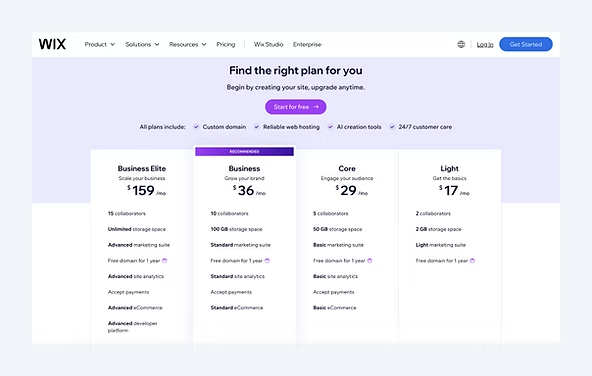
Wix offers a free plan, which was perfect for my little hobby-grade project of creating a website for our clan in an MMO game I used to play at the time. However, little fun projects are where the utility of the free version ends. With the loud Wix branding banner and no custom domain, it isn’t of much use when it comes to professional websites.
Of course, you always have the option to upgrade to a paid plan and get all the good stuff, but this is where things get interesting. Having used the free version, I always perceived Wix as a relatively affordable website builder. I was wrong. I recently checked out the pricing out of curiosity, only to discover that the paid plans start at $17/mo. That’s right – more than twice as much as what I pay for my Divi subscription.
Moving on to Elementor – I used this tool for a couple of months as part of a short, experimental project a few years ago. The reason I chose Elementor was that it’s FREE! Or, that’s what it looks like. However, I discovered it to be more of a freemium model – a lot of great features, templates, and customization options were paywalled.
While I understand that a free plan might be great for some, I personally found it pretty frustrating and limiting. This is something the folks at The Free Website Guys brought to my attention when telling me about why they recommend Divi – it’s way more convenient when you get everything you need under a single, simple subscription.
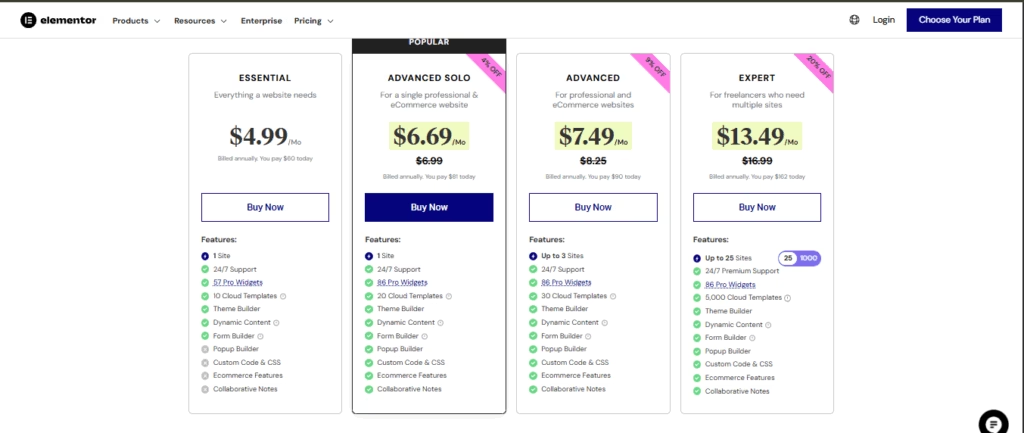
Coming to the paid plans, Elementor is pretty competitive when compared to Divi – with the cheapest plan starting at around five US dollars. But there’s a catch – a bunch of crucial features, such as popup builders and custom CSS are only available on higher plans, whereas Divi bundles them all in their base plan, giving you access to all Divi features.
There’s always the Divi Pro version for those who want more, but it mostly comes with nice add-ons that you may or may not need, such as unlimited Divi AI access and Divi Cloud storage. Hence, when it comes to Elementor Vs. Divi, the latter is far more practical in my honest opinion.
So, is Divi the only builder worth using? Not at all. But for someone like me – no coding background, just trying to create a website without stress – it turned out to be the perfect fit. And if you’re an experienced web designer seeking an alternative to Elementor Pro, trying out Divi sounds like a no-brainer!
Creating the Basics Using Divi Page Builder
That beautiful table on our homepage with collapsible toggles?
I designed it, tweaked it, and added the text – all by myself! Seeing it come to life without a single line of code was inspiring.
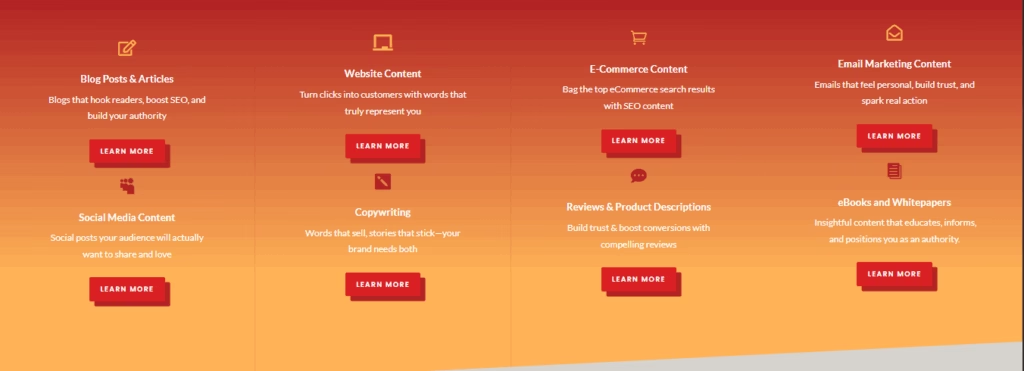
Arranging our content writing service descriptions and adding those little icons?
That was just a matter of dropping in Divi modules and styling them with a few clicks. No HTML. No CSS. Just pick, place, and hit the save button.
Customizing and Adding Flair with Divi
Once I got comfortable with the basics, I started experimenting with more advanced tweaks to truly shape the site into what I visualized our website to be.
- Creating Custom Buttons and Callouts:
I didn’t just stick with the default button styles. I made sure our CTAs popped with on-brand colors, hover effects, and the right placement to guide clicks. All of this was handled visually through Divi’s styling panels. No manual CSS hacks were required. - Responsive Design Controls:
This was a big one. Divi let me preview and adjust layouts for mobile, tablet, and desktop views individually. I resized fonts, re-arranged columns, and tweaked padding only where needed. That meant our pages looked crisp and polished, whether it was opened on a mobile, desktop, or tablet. - Dynamic Section Building:
For pages like Custom Orders and Readymade Content, I used Divi’s row/column layout builder to stack sections, alternate images with text, and build clean, scannable flows. I used scroll effects, background gradients, and animation toggles to add just the right touch of movement without overwhelming the user. - Saved Layouts are Time Savers:
Once I had a section I liked – say, an quote request form or an FAQ block – I saved it. Now, I can drop it onto any page in seconds. That consistency keeps the brand experience smooth and cohesive.
Divi gave me the confidence to build like a designer, without needing to be one.
The Moment It All “Clicked” for Me
I still remember the first time I finished editing a page and saw the changes go live. After spending hours on YouTube tutorials and tinkering with the customizations, there it was – our very own corner of the internet. It wasn’t perfect, but it was ours. And in that moment, everything clicked.
Up until then, I had been unsure. If you asked me “how hard is it to create your own website without hiring a pro?”, I’d have probably shook my head and said it’d be too tedious. But once I started working with WordPress, things slowly began to make sense. Eventually, I realized the hardest part was just getting started and pushing through the early confusion.
A few days after launching, a friend messaged me out of the blue: “Did you hire someone to build this? It looks really clean.” That single comment gave me a rush of pride I didn’t expect. It was a small win, but it meant everything. It was proof that all the struggle was finally turning into something re – and something I could be proud of.
Why Divi Stands Out, And Why It Might Be Right for You Too
| Feature | Why It Matters for You |
| Customization | Gives total freedom for designing, perfect if you care about branding, precision, and standing out. |
| E-commerce Friendly | Seamless WooCommerce integration makes it easy to sell products – whether physical or digital. |
| All-in-One Solution | Theme + visual builder in one neat package—no need to juggle multiple tools or plugins. |
| Lifetime Subscription | Pay once, use forever. If you’re after maximum ROI for the long term, the lifetime plan is a no-brainer. |
How Long Does It Actually Take to Design a Website?
Let’s be real – how long should it take to design a website? Well, when I first got started with Divi, it took me around two days on and off to finish customizing my first page (including time spent watching YT tutorials). There was definitely a learning curve (as with anything new), but Divi’s drag-and-drop builder made it surprisingly manageable. It felt less like coding and more like playing with building blocks.
Now, if you’re wondering about realistic timelines for a newbie:
- Personal blog – 1 to 3 days (especially if you’re keeping it simple)
- Small business website – 3 to 7 days, depending on the number of pages and features
- An Online Store – Two to three weeks, especially with highly customized store settings and various plugin integrations.
So, is website design hard? Not really – not with the right tools and mindset. The trick is not to overwhelm yourself. Start small, maybe with just one page. That one step builds momentum, and before you know it, you’re tweaking colors and adding forms like a pro.
Just start. Even if it’s a single page, it’s a big win.
Common Fears About Building Your Own Website… and What Actually Happened
There’s no shame in admitting it – everyone starts with a little doubt. You’re not alone if thoughts like these have crossed your mind:
- “What if I mess up the layout?”
- “What if it ends up looking totally amateur?”
- “I’m not tech-savvy… can I even handle this?”
- “Is making a website hard for someone like me?”
Totally legit questions. But here’s what usually happens when people actually give it a shot:
👉 Drag-and-drop builders make layout design feel more like playing with digital Lego than writing code. The design flexibility is mind-blowing.
👉 Most themes are already professionally designed – so even if you don’t touch a single design element, your site won’t scream “DIY disaster.”
👉 Platforms like Divi walk you through everything. Step-by-step. Plus, there’s plenty of YouTube tutorials, support forums, and customer support to back you up if you hit a snag.
👉 You don’t need to go all-in on Day 1. Start slow, and learn as you go. If you’re wondering how hard is it to create a WordPress website or how hard is it to build a Shopify website, the best way to find out is… to try it.
Honestly? If you can send an email, you can build a site. Building your new website is breezy when you have a feature-packed and intuitive tool for it.
Handy Stuff I Wish I Knew Before I Started
When I first got started with building websites, I wasted days tweaking headers and stressing over every pixel. Here’s what I wish someone told me upfront:
- Keep it simple, seriously. Fancy layouts can wait – get your basics right first.
- Don’t obsess over the header/footer. Anyone who visits your site cares more about your content than your top bar.
- Go responsive from the start. Mobile friendly isn’t optional anymore.
- Learn the tech lingo. This can save you a lot of confusion when looking up solutions for any hurdles you might face.
If I Can Do It, So Can You
I’ll be real with you – I used to think building a website was only for professional web designers. But once I stopped overthinking it and actually tried, it was way less intimidating than I imagined.
Sure, there was a bit of trial and error, but tools today are insanely beginner-friendly. If you’re still wondering how hard it is to build a website, the answer is: not nearly as hard as staying stuck and overthinking it. With website-building tools offering a plethora of professionally designed, readymade themes, most of the heavy lifting is already done for you.
And if you’re looking for a tool that blends flexibility with ease, the Divi theme builder is a solid place to start. So yeah, building a website isn’t just for developers anymore. With the right tools and mindset, you’ll be surprised how quickly you can bring your ideas to life!
FAQs
How hard is it to build a good website if you’ve never done it before?
Honestly, not at all! With tools like WordPress, DiVi, and drag-and-drop builders, learning how hard it is to build a website becomes more about exploring than struggling.
Can I switch WordPress themes later if I don’t like the first one?
Absolutely. One of the benefits of WordPress is its flexibility. You can switch to another WordPress theme without losing your content, though layouts may need adjusting.
How hard is it to make a WordPress website that looks professional?
If you choose the right WordPress theme and use a visual builder, it’s surprisingly doable. In terms of how hard is it to make a WordPress website, the hardest part might just be picking a design!
What’s the best alternative to Elementor for WordPress users?
If you’re exploring alternatives to Elementor, Divi is a strong contender. It offers an all-in-one solution with themes and comprehensive page building tools, making setup and customization seamless.
I want to sell products—how hard is it to build a website for e-commerce?
If you’re wondering “how hard is it to build a website for selling products online?”, you may rest easy that it’s not complicated at all. Theme builders like Divi support powerful WooCommerce plugins that allow you to leverage the platform’s features to the fullest.


Hey, mind sharing how you changed the color of the hamburger menu icon on the mobile version?
Btw totally agree with you about Divi being a game-changer…I have been using it to build a little website for my clinic.
Hey Ralph! You can change the hamburger menu icon color on your site’s mobile version by using the following custom CSS code:
.mobile_menu_bar:before {
color: #32CD32;
}
Go to your WordPress dashboard>Appearnce>Customize. Select Additional CSS and then copy-paste the above code into the custom CSS field (but replace the color code with the hex code of your desired color) and hit publish. That should do it 🙂